
Gojiberry.ai Integration
Connect Gojiberry.ai to SmartReach and automatically transfer high-intent LinkedIn leads into your cold email campaigns.
What is Gojiberry.ai Integration and how does it help?
The Gojiberry.ai integration lets you build targeted lead lists from LinkedIn and automatically transfer them into your SmartReach campaigns. Gojiberry.ai monitors real-time signals like content engagements, job changes, funding events, and competitor interactions to identify high-intent prospects.
While Gojiberry.ai excels at identifying high-intent LinkedIn leads, SmartReach provides the complete multichannel outreach infrastructure you need to convert those leads:
- Seamlessly combine cold email, LinkedIn, WhatsApp, and phone calls in unified sequences
- Advanced warming, rotation, and reputation management across unlimited email accounts
- 95%+ inbox placement rates with built-in spam testing and email validation
Gojiberry finds your ideal prospects. SmartReach turns them into customers.
Benefits of SmartReach - Gojiberry.ai integration:
- Transfer leads directly from Gojiberry.ai to SmartReach campaigns
- Skip manual CSV exports and uploads
- Launch LinkedIn outreach and multichannel campaigns faster
Platform capabilities comparison - Prospecting and outreach processes
| Capability | Gojiberry.ai | SmartReach.io | Best Practices |
|---|---|---|---|
| Lead Identification | ✓ AI-powered signal detection | x | Use Gojiberry |
| LinkedIn Campaigns | ✓ Basic outreach | ✓ Multichannel LinkedIn sequences | Use SmartReach |
| Cold Email at Scale | x | ✓ Unlimited sends | Use SmartReach |
| Email Deliverability | x | ✓ Warming | Use SmartReach |
| Multichannel Sequences | Only LinkedIn | ✓ Email + LinkedIn + WhatsApp + Calls | Use SmartReach |
| A/B Testing | x | ✓ Advanced split testing | Use SmartReach |
| Team Features | x | ✓ Shared inbox | Use SmartReach |
| Email Volume | Limited | Unlimited across multiple domains | Use SmartReach |
| CRM Integration | x | ✓ HubSpot, Zoho, Salesforce, Pipedrive, Make, Clay, Zapier | Use SmartReach |
Is there an Gojiberry.ai exclusive offer for SmartReach users?
Yes, use discount code SMARTGOJI at signup for 10% off your first year on Gojiberry.ai.
How it works
Before you start
You'll need active accounts on both Gojiberry.ai and SmartReach. If you don't have a Gojiberry.ai account yet,
Step 1: Build your lead list in Gojiberry.ai
1.1 Create an AI agent
- Sign up or Log in to Gojiberry.ai
- Navigate to Signal Agents on left-side pane
- Click Launch Agents (If prompted, then choose your agent type as Autopilot Agent – Runs 24/7 to find leads matching your criteria)
1.2 Define your Ideal Customer Profile (ICP)
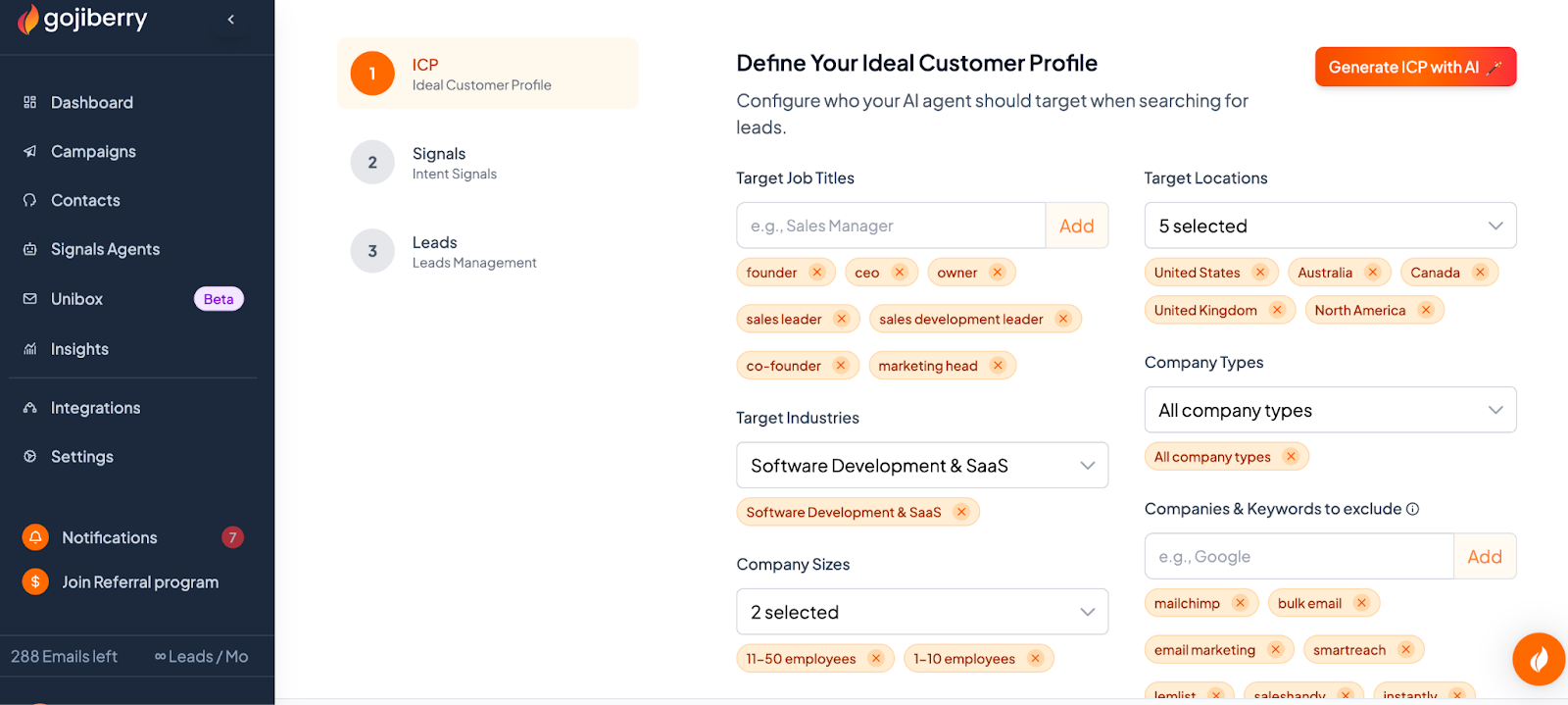
- Go to the ICP SetupTab.
- Enter Job Titles (e.g., "Founder", "CEO", "CMO") – Gojiberry.ai handles variations automatically
- Select Industries from the dropdown or add custom prompts (e.g., "SaaS companies only")
- Choose Company Size ranges (e.g., 11-50 employees) – select multiple if needed
- Specify Locations (e.g., "North America", "United States", "Canada")
- Filter by Company Types (nonprofits, startups, public, or private)
- Add Exclusions to filter out unwanted profiles (e.g., "Score very low: salespeople, agencies, freelancers")
Tip: Refine your ICP based on the quality of leads you receive.
1.3 Configure Signals for Lead Detection
Signals are triggers that alert the AI to potential leads. Add 10-12 signals for best results
- Go to the Signals tab
- Add the following signal types:
Company Page
- Link your LinkedIn company page to detect interactions (optional for low-activity pages)
- You can also track :
- profile visitors
- new followers on your company page
- people interacting with your LinkedIn profile (likes/comments)
Engagement Keyword
- Enter terms related to your offering (e.g., "cold email", "lead generation", "CRM challenges")
Expert Creators
- Add LinkedIn profiles of influencers or experts in your industry
Change Events
- Track top 5% active ICP profiles (recent content posters)
- Exclude broad names (e.g., "Amazon") to avoid irrelevant leads
- Click Save
Your agent will launch within minutes and start logging activity. Leads will include enriched data like LinkedIn profiles, emails, and intent reasons.
Tip: Start with 10-12 signals for faster results. Using only 1-2 signals will slow lead generation.
1.4 Review and manage Leads
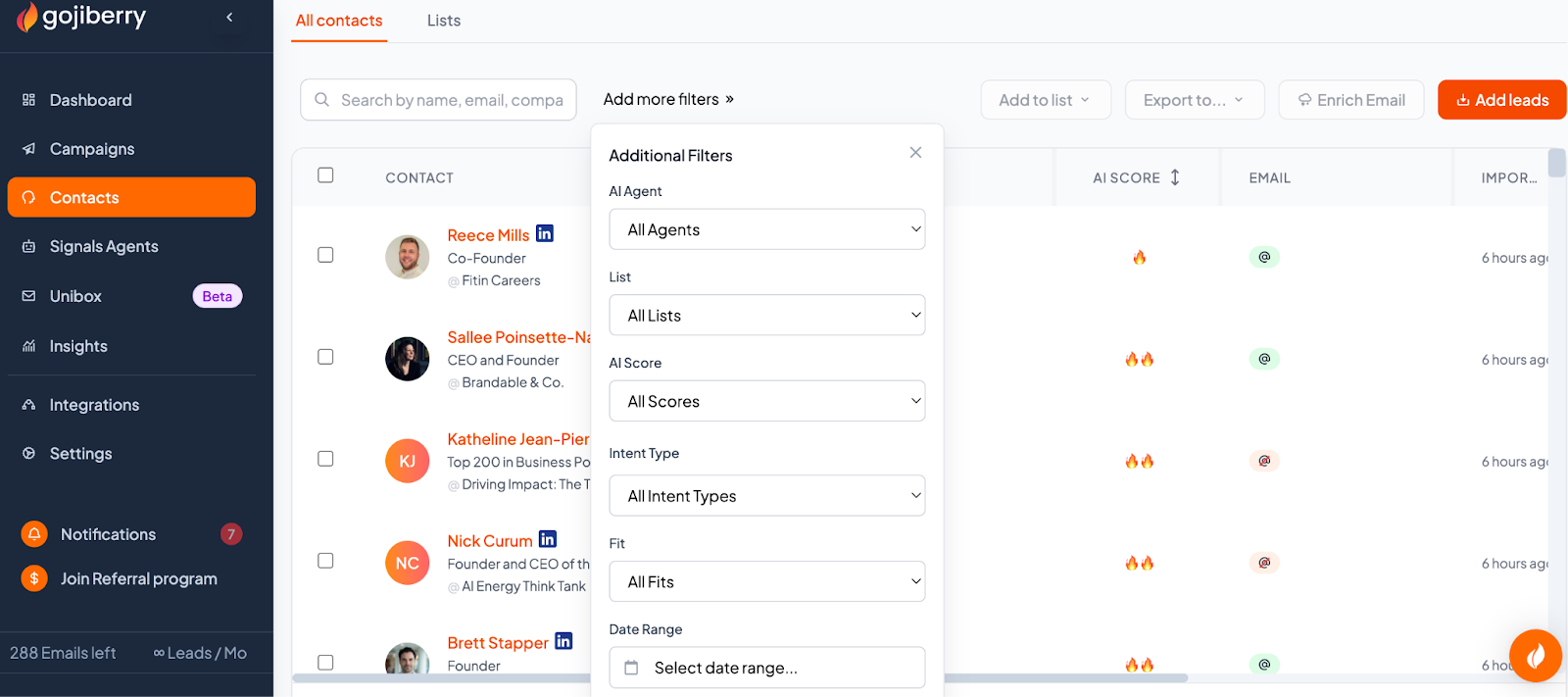
- Navigate to Contacts
- Filter by time (e.g., last 24 hours)
- Review each lead:
- Check interaction history, matching signals, and ICP score
- Mark as Fit or Not Fit to train the AI
Tip: Create a separate lead list based on your target segmentation. You can automate the export of these leads directly into a SmartReach campaign.
Pro Tip:
Use Gojiberry as Your Research Engine, SmartReach as Your Conversion Engine
Smart outbound teams follow this workflow:
- Gojiberry identifies high-intent prospects based on real-time signals
- Manual review filters for quality (1-2 minutes daily)
- SmartReach automatically enrolls prospects in multichannel sequences
- Your team focuses on conversations, not campaign management
This division of labor lets you combine Gojiberry's AI-powered lead identification with SmartReach's enterprise-grade delivery infrastructure. The result? More conversations with better-qualified leads.
Step 2: Connect Gojiberry.ai to SmartReach
You can transfer leads from Gojiberry.ai (CONTACTS section) to SmartReach using one of three methods:
Option 1: Direct integration (recommended)
This method automatically sends new Gojiberry.ai contacts to your SmartReach campaign.
Set up the integration
- In Gojiberry.ai, go to Integrations
- Select SmartReach
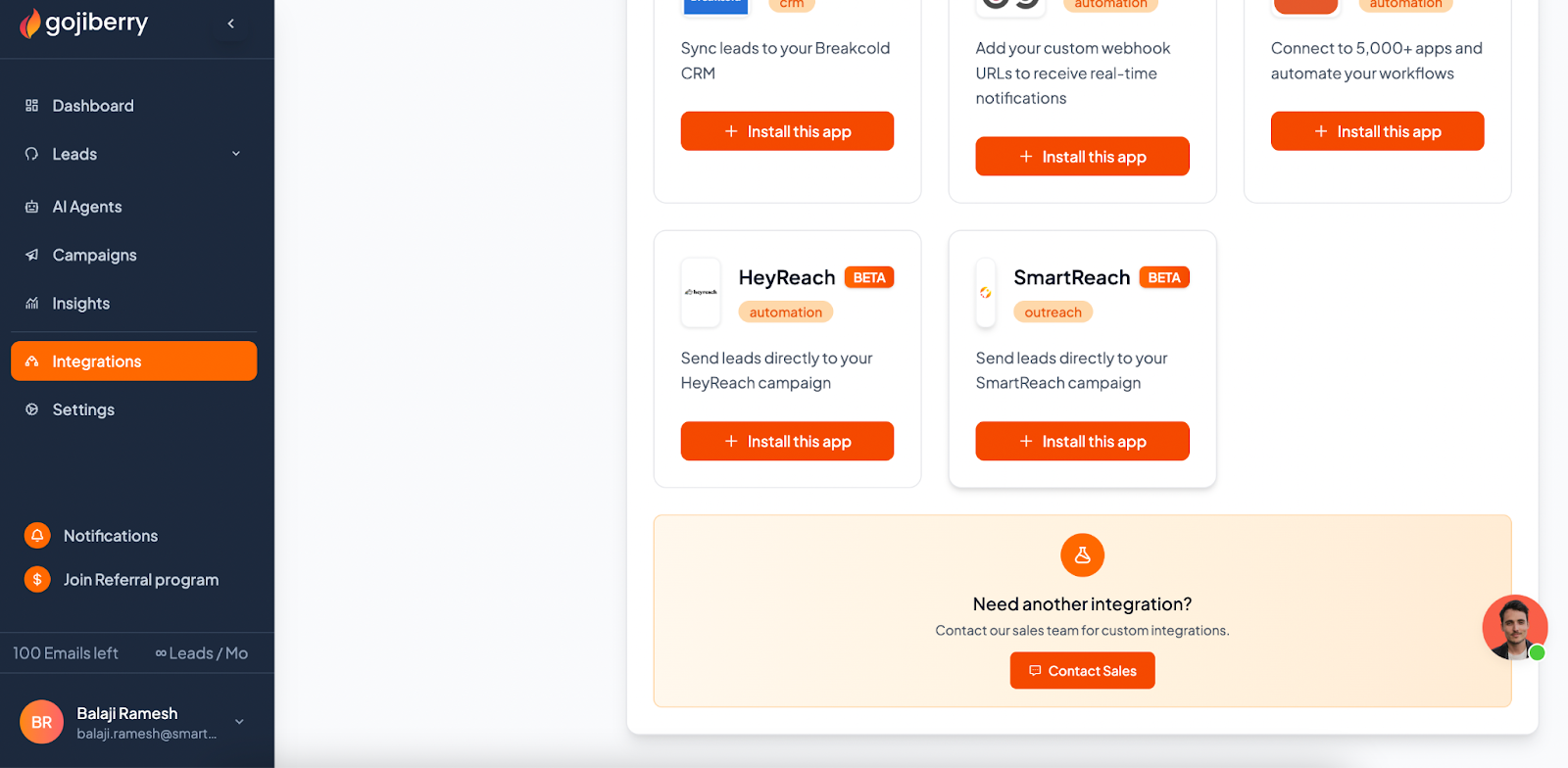
- Enter your SmartReach API Key
- To get your API key in SmartReach:
- Go to Settings > Integrations > SmartReach API
- Click Get API Key
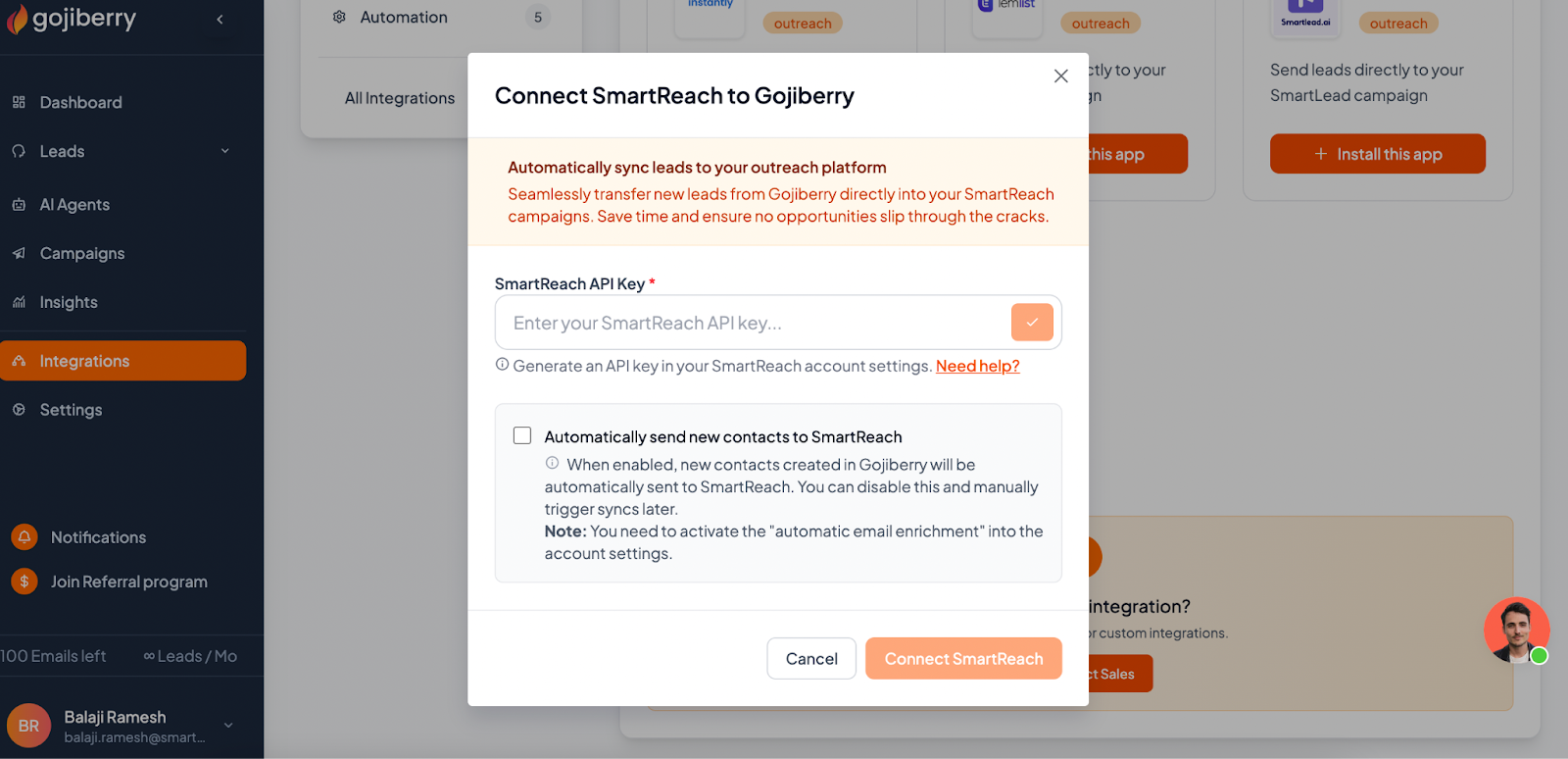
- Check the box to automatically send new contacts to SmartReach
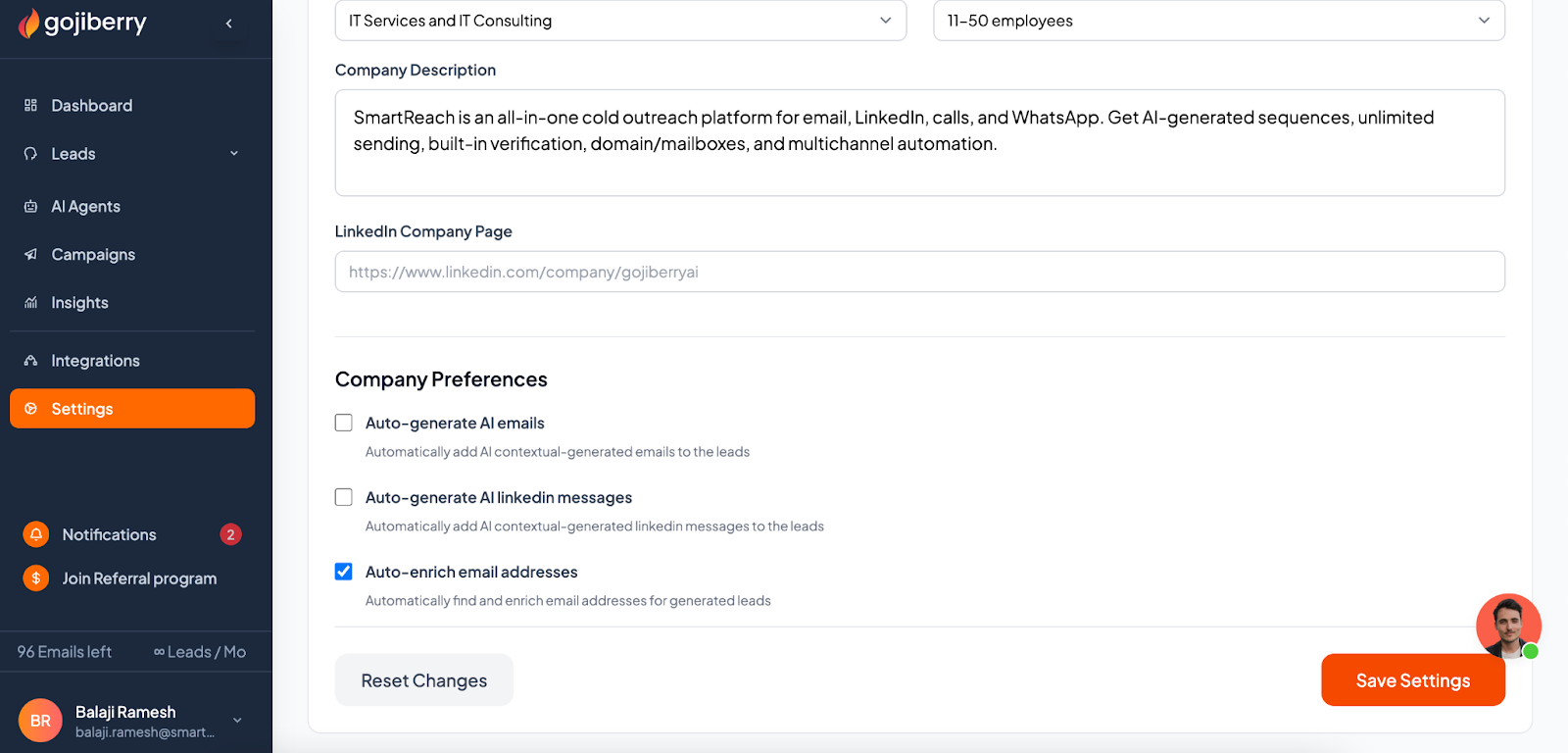
- Go to Gojiberry Settings > Company Preferences
- Enable Auto Enrich email addresses (required for automatic sync)
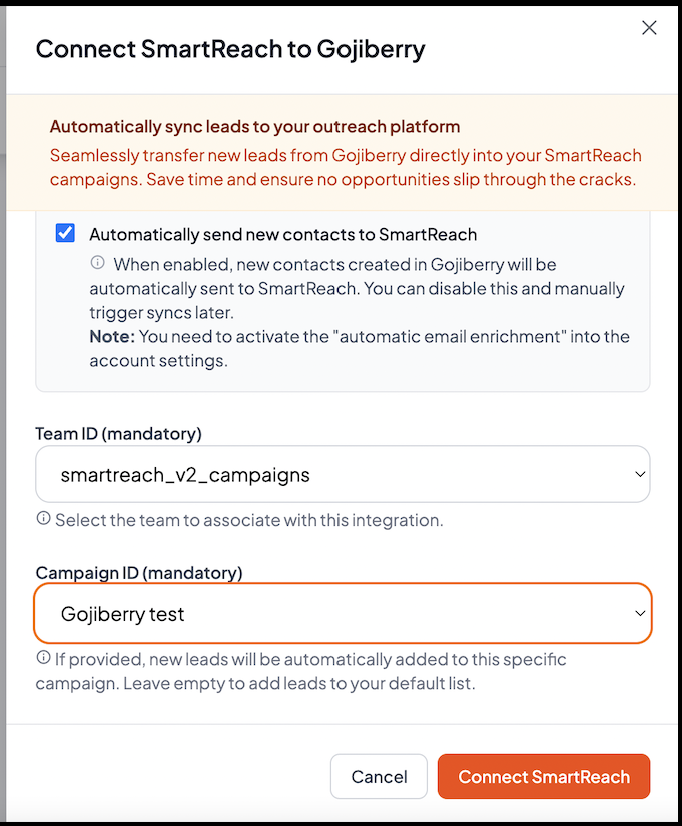
- Select your SmartReach Team ID and SmartReach Campaign Name
- Click Connect SmartReach
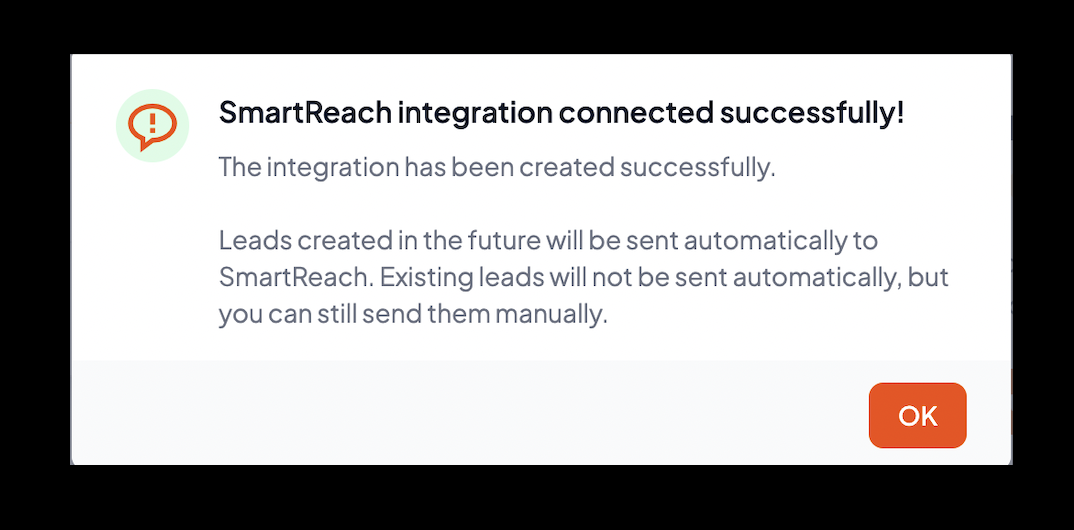
What happens next: New contacts created in Gojiberry.ai will automatically transfer to your selected SmartReach campaign.
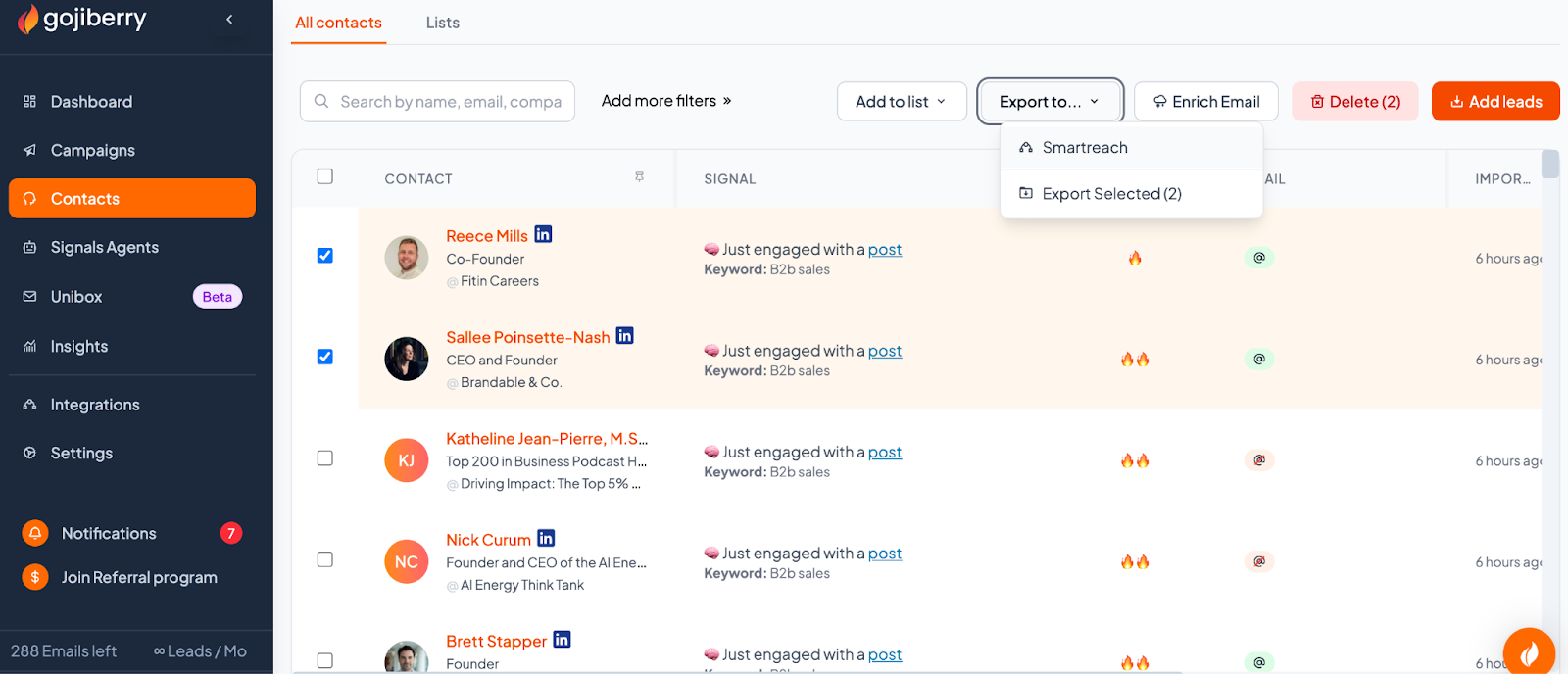
Option 2: Manual push from Gojiberry ‘Contacts’ section
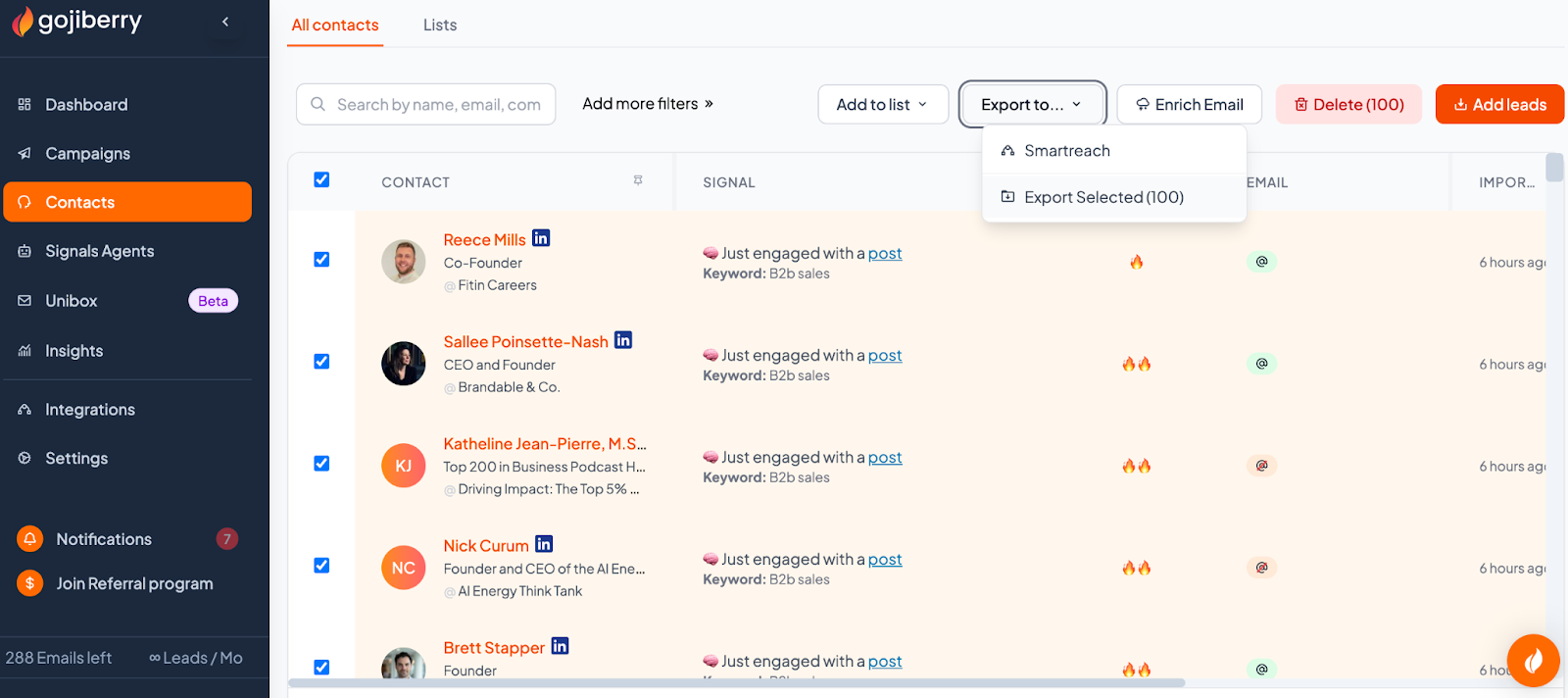
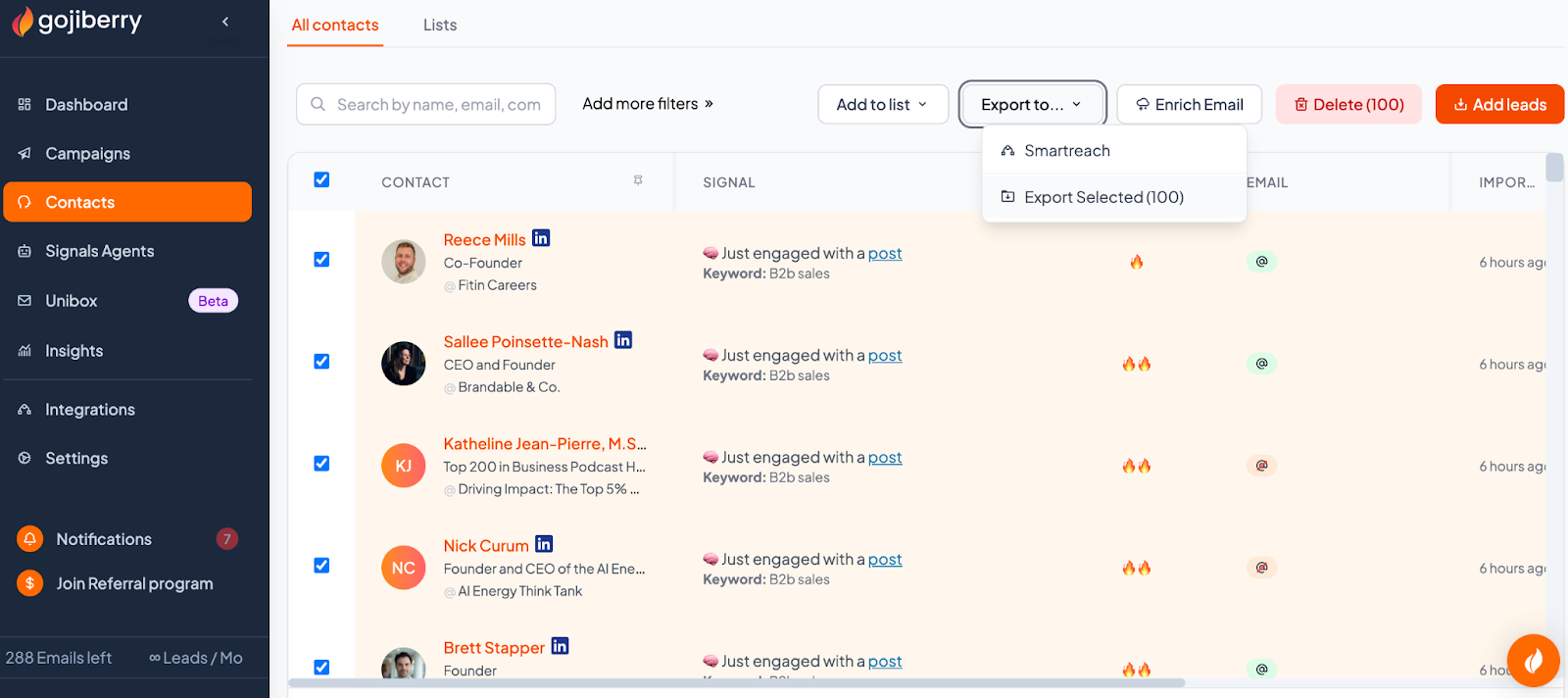
Use this method if you want to review and select specific leads before sending them to SmartReach.
- Navigate to Gojiberry Contacts section
- Filter leads by criteria (e.g., last 24 hours, ICP score)
- Review each lead's details:
- Interaction history
- Signals matched
- ICP score
- Select desired leads using checkboxes (5-20 per batch works best)
- Mark leads as Good Fit or Not a Good Fit to refine your ICP
- Click Enrich email address (mandatory before export)
- Click Export at the top of the Contact section
- In the export dialog, choose SmartReach
- Select your SmartReach Team ID and SmartReach Campaign Name
- Click Export
You'll see a notification banner when the export is successful.
Tips:
- Process batches daily or weekly to avoid backlog
- Emails enrich only on push, which helps filter out low-quality leads early
- If push fails, verify your SmartReach integration in Gojiberry Settings > Integrations
- Contact [email protected] for API issues
Manual CSV Upload
Use this method for one-off transfers or if you prefer working with CSV files.
- In Gojiberry.ai, go to Contacts
- Select your leads
- Click the Export button to download a CSV file
- In SmartReach, go to Prospects > Import Prospects
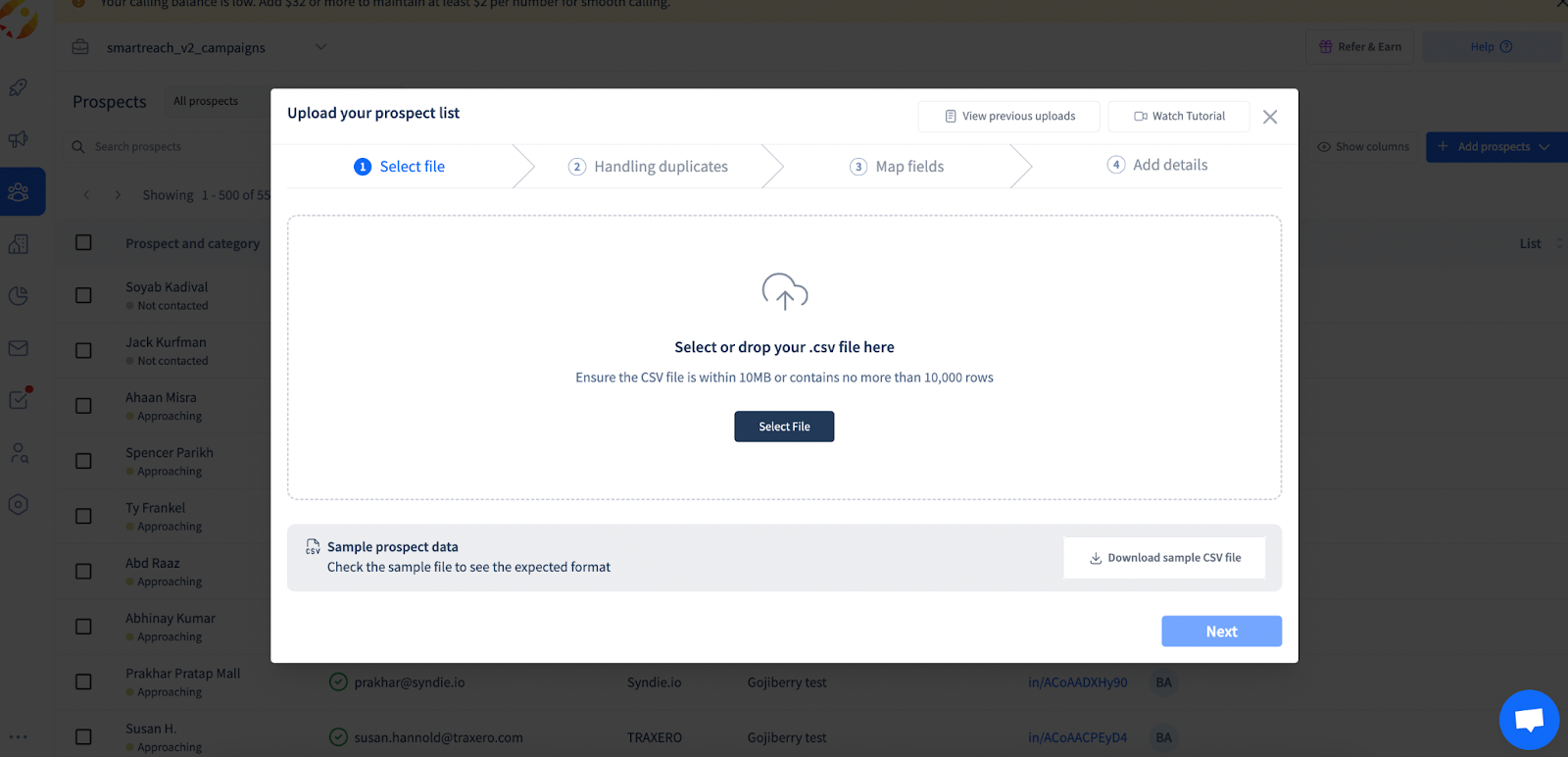
- Upload your CSV file
- Map columns (e.g., match "Email" to SmartReach's email field)
- Click Import
SmartReach will validate emails and automatically add tags.
Note: Linkedin profile URL imports to SmartReach are unlimited on all plans. Incase you need emails then that is charged as per credits
Frequently Asked Questions :
Is this Gojiberry integration available for my plan?
The Gojiberry.ai integration works with all SmartReach plans (except Basic plans). You'll need:
- An active SmartReach account (any plan)
- An active Gojiberry.ai account
You can export unlimited leads from Gojiberry to SmartReach with the integration or with a CSV
How do I get my SmartReach API key?
- Log in to SmartReach
- Go to Settings > Integrations > SmartReach API
- Click Get API Key
- Copy the key and paste it into Gojiberry.ai
Why not just run campaigns in Gojiberry if I'm already paying for it?
Gojiberry is designed for LinkedIn signal detection and basic outreach, not for enterprise-scale email campaigns. Here's what you get with SmartReach:
- Email Volume: Send from multiple email accounts simultaneously (Gojiberry is limited)
- Deliverability Infrastructure: Domain warming, email validation, spam testing, & reputation management builtin
- Multichannel Orchestration: True sequences combining email + LinkedIn + calls (not just LinkedIn)
- Team Collaboration: Unified inbox, lead assignments, and consolidated reporting
- Advanced Features: Conditional logic, webhook integrations, custom fields, API access
- Proven Track Record: 5,000+ companies trust SmartReach for deliverability
Think of it this way: Gojiberry finds the right people. SmartReach ensures your message reaches them and drives conversions.
Can I use both Gojiberry and SmartReach for LinkedIn outreach?
Yes! Use Gojiberry for initial LinkedIn engagement with high-intent prospects, then transfer them to SmartReach for multichannel follow-up. This way, you:
- Respond immediately to signals through Gojiberry's LinkedIn campaigns
- Follow up via email, WhatsApp, and calls through SmartReach
- Create a comprehensive touchpoint strategy that competitors using only one platform cannot match
Many successful teams use Gojiberry for "strike while hot" LinkedIn messages, then SmartReach for sustained, multichannel nurturing.
What's the ROI of using both platforms together?
Customers report:
- 3-5x increase in qualified meetings when using both vs. either platform alone
- 60% reduction in lead research time
- 40% improvement in email deliverability (using SmartReach vs. sending from single accounts)
- 85% time savings on campaign management and follow-ups
The typical customer sees positive ROI within the first month when using both platforms together.
Can I send leads to multiple SmartReach campaigns?
Yes. When setting up the integration or manually pushing leads, you can select different campaigns each time. If using automatic sync, you'll need to change the campaign selection in your Gojiberry integration settings.
What happens if I don't enable "Auto Enrich email addresses" in Gojiberry?
If you're using the automatic integration (Option 1), you must enable "Auto Enrich email addresses" in Gojiberry Settings > Company Preferences. Without this setting, contacts won't automatically sync to SmartReach.
How many signals should I add in Gojiberry.ai?
Add 10-12 signals for best results. Using fewer than 5 signals will slow down lead generation. Using more than 15 may create too much noise.
How are Gojiberry.ai credits calculated or charged?
You have 100 email credits/month (1 credit = 1 email found) when creating your account. Then you can buy more with one-time packs : $55 for 500 emails and $200 for 2500 emails
What if the integration fails or leads don't transfer?
- Verify your SmartReach integration in Gojiberry Settings > Integrations
- Check that your API key is entered correctly
- Ensure "Auto Enrich email addresses" is enabled (for automatic sync)
- Contact [email protected] if the issue persists
How often should I review and push leads manually?
If using Option 2 (Manual Push), process batches daily or weekly to avoid backlog. This also helps you maintain lead quality by reviewing prospects before they enter your campaign.
Can I use leads from Gojiberry.ai for multichannel outreach?
Yes. Once leads transfer to SmartReach, you can add them to multichannel campaigns that include cold email, LinkedIn outreach, and cold calling. To cold call you will need to additionally enrich lead data with contact numbers.
Do enriched emails count against my Gojiberry.ai credits?
Yes. Emails enrich only when you push leads to SmartReach or export them. This helps you save credits by filtering out low-quality leads before enrichment.
Need help? Contact our support team or reach out to [email protected] for Gojiberry-specific questions.
Updated about 2 months ago